
Editing or deleting your Trade Ad
 By jerxUpdated September 6, 2026
Made a typo or want to update an ad? Here is what you can and can't change after posting.
Editing an ad
Open your trade ad and use Edit. Two rules apply:
- Once only. An ad can be edited a single time. After that it locks.
- Within 15 minutes. You can only edit inside the first 15 minutes after posting.
So if you spot a mistake, fix it quickly and get it right in that one edit. Every edit is recorded for moderation.
Past the window, or already edited? Cancel the ad and post a fresh one.
Changing an ad's status
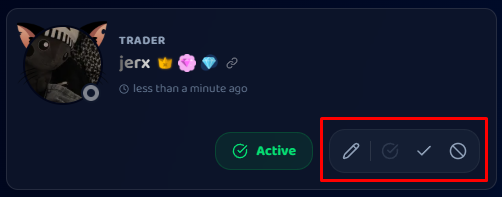
As the ad's owner, you'll see status controls on the ad:
- Set Active: the normal, visible state.
- Complete: mark it done after you have finished the trade in-game.
- Cancel: take it down.
"Deleting" means cancelling
There is no hard delete. Choosing Delete on an ad marks it as cancelled and removes it from the feed.
Ad statuses at a glance
| Status | Meaning |
|---|---|
| Active | Live and visible in the feed. |
| Completed | You finished the trade. |
| Cancelled | You took it down. |
| Expired | Automatically retired after 7 days. |
Tip
Mark trades Completed when they are done, and cancel anything you no longer want. It keeps the feed accurate and your profile tidy.
Was this article helpful?