
Token Deals explained
 By jerxUpdated September 6, 2026
Token Deals shows live in-game listings where players are selling items for that game's tokens, pulled in as they appear so you can grab good buys fast. It is available in Baddies and Blade Ball under Deals (for example, Baddies Deals).
Reading a deal card
Each card shows:
- The item (click it to open the item page).
- The item's Bloxtsar Value, token value, and RAP for reference.
- The listing price in tokens, what the seller is asking.
- A listing-type badge: booth, sign, or store.
- When it was first seen and last synced.
- A live indicator (fresh, seen in the last few minutes) or a stale one.
Because the reference value sits right next to the asking price, under-value deals stand out.
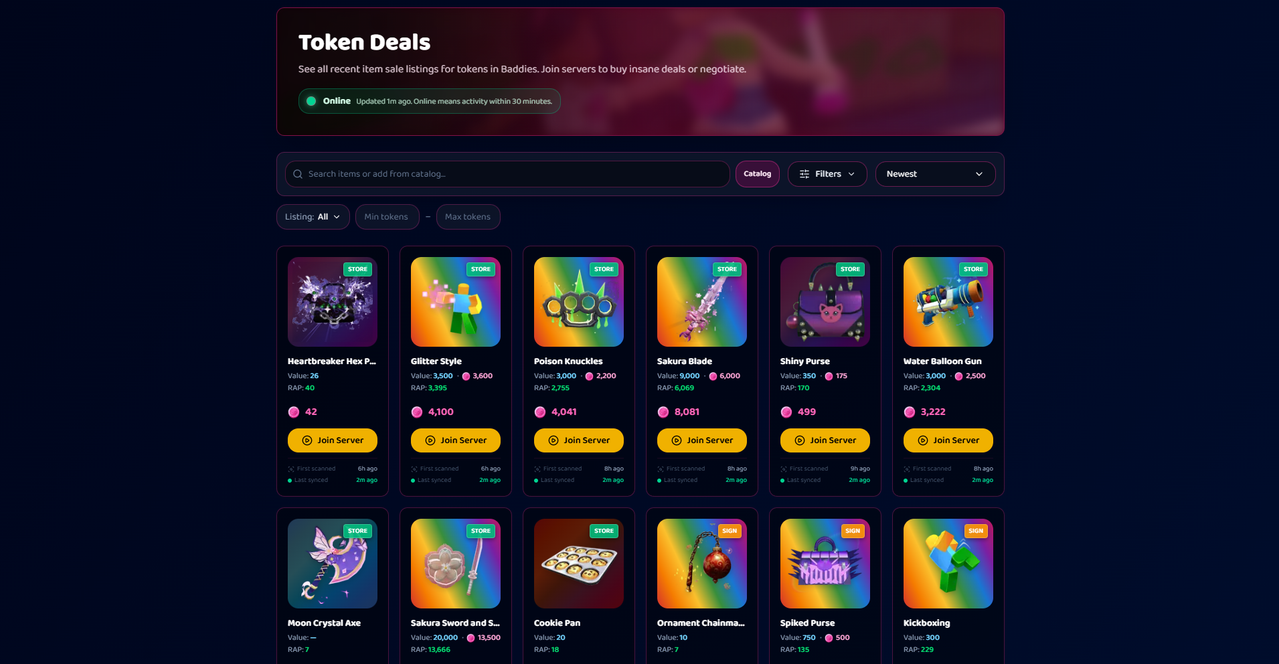
Only fresh listings
The feed only shows listings seen very recently (roughly the last half hour), so what you are looking at is likely still available. Stale cards are marked so you know they may be gone.
Filtering and sorting
Find the right buy with filters like text or item search, category, rarity, demand, value range, listing type, and min or max token price. Then sort by newest, or price low to high, or high to low, with infinite scroll.
Joining the seller
When a listing includes a server, a Join Server button drops you into the right Roblox server to buy. Clicking a card opens the seller's details (Roblox name, ID, avatar) so you know who you are dealing with.
VIP and the best deals
The deepest under-value listings reserve their Join Server button and seller details for VIP members. Non-VIP users see a Buy VIP to Join prompt on those specific deals. Everything else stays browsable to everyone.
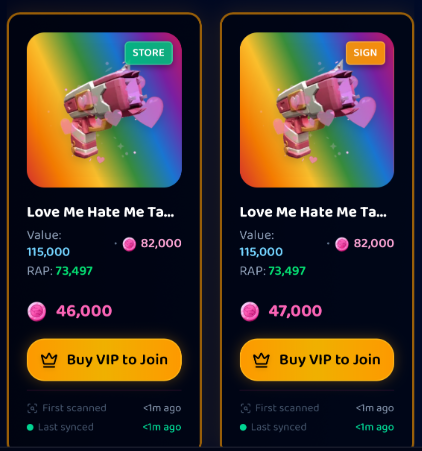
Learn more at What is VIP?.
Tip
Sort by price low to high and watch the value-versus-price gap. That is where the steals are.
Was this article helpful?