
How to post a Trade Ad
 By jerxUpdated September 6, 2026
A trade ad tells everyone what you have and what you want. Here is how to post one.
Step by step
- Open your game hub and go to Trade Ads, then Create Ad (for example, Baddies).
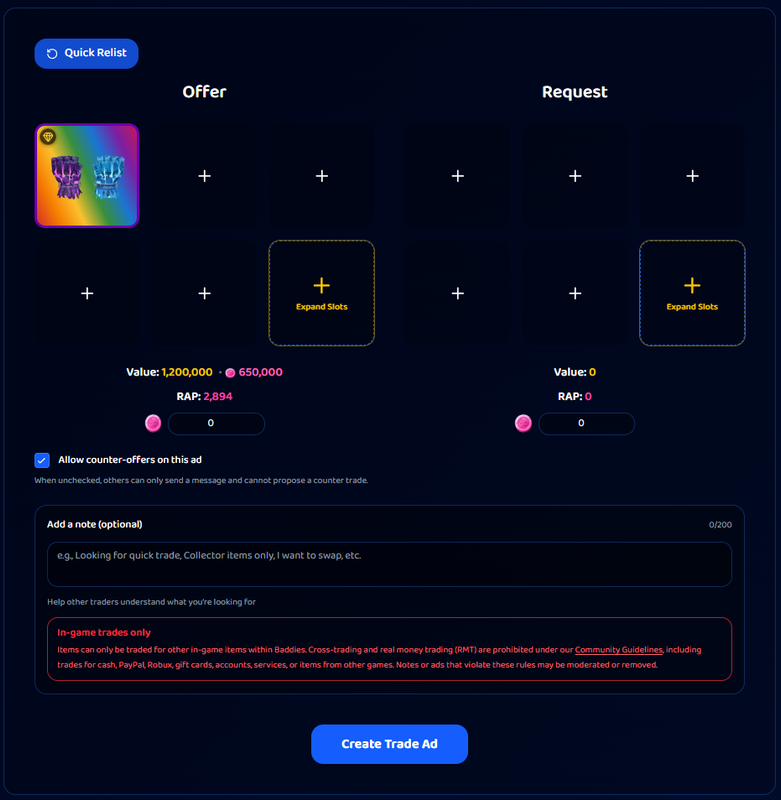
- Build the Offering side, the items you are giving. Click a slot to open the item picker and search the catalog.
- Build the Requesting side, what you want in return.
- Optional: add a currency or token amount to either side, if the game supports it.
- Optional: write a short note (up to 200 characters).
- Choose whether to allow counter-offers (on by default).
- Click Create Trade Ad.
Item limits
- Items per side are capped by the game. Baddies allows up to 18 per side, while MM2 allows 4. The picker won't let you exceed the game's limit.
- Quantities run from 1 to 100 per item. Add the same item once and set its quantity rather than adding duplicate slots.
- Every ad needs at least one item, or currency where the game allows currency-only offers.
Notes are moderated
Notes pass through our filters. Cross-trading attempts, off-platform links and "add my Discord" style handoffs are blocked, so keep trading on Bloxtsar. Keep notes clean and relevant.
Posting cooldown
To keep the feed fair, there is a wait between ads, per game:
- Standard: one new ad every 15 minutes.
- VIP: one new ad every 8 minutes, plus a Quick Relist button for your recent ads.
Post too fast and you'll be asked to wait a moment.
Counter-offers
Leaving Allow counter-offers on lets others send you a proposed item-for-item swap right from your ad. Turn it off if you only want plain messages.
How long ads last
Trade ads expire automatically after 7 days. Completed a trade sooner? Open your ad and mark it Completed. See Editing or deleting your trade ad.
Was this article helpful?