
Using the Trade Calculator
Updated September 6, 2026
The Calculator is the fastest way to check whether a trade is fair. Find it in your game hub under Calculator (for example, Blade Ball Calculator).
How it works
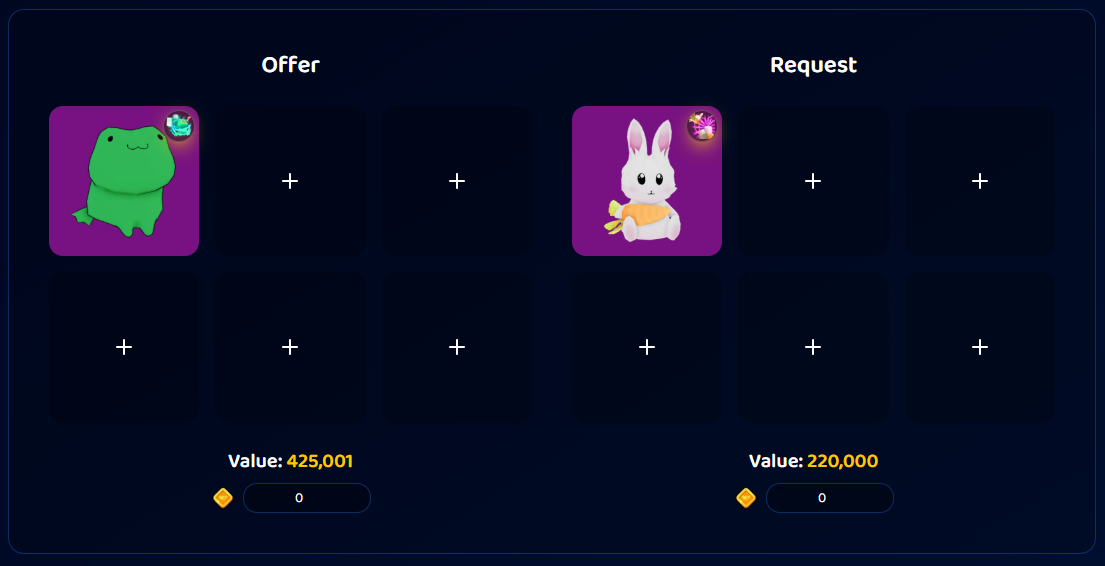
- Build the Offer side, the items on your end. Click a slot to search the catalog and add items.
- Build the Request side, what you would get back.
- Optional: add a token or currency amount to either side, for games that support it.
- Read the totals for each side.
Each side totals up:
- Value (plus token value for token games), and
- RAP, where the game supports it.
Add up to the game's per-side item limit, the same cap as trade ads (for example, 18 in Baddies).
Reading the result
The Calculator shows both sides' totals side by side, and you compare them to see who is ahead and by how much. There is no automatic win, fair, or lose verdict. You make the call from the numbers.
A few tips for judging fairness:
- Compare Value to Value and RAP to RAP separately. An offer can win on one and lose on the other.
- Factor in demand and trend (see Demand, trend & item stats). Overpaying slightly for a high-demand item can still be a smart trade.
- Small differences are normal. Trading rarely lands exactly even.
Handy for
- Sanity-checking an incoming counter-offer.
- Planning a multi-item deal before you post.
- Seeing how tokens stack up against item value.
Want a second opinion?
Some games have a WFL (win, fair, loss) discussion channel where traders vote on your deal. An AI Trade Assistant (Beta) is also rolling out to help evaluate offers. See A tour of Bloxtsar.
Was this article helpful?