
How to change your online status
 By jerxUpdated September 6, 2026
Your status is the little presence badge people see next to your name. You change it from the chat sidebar, not from Settings.
Change it
- Open Messages (the chat sidebar).
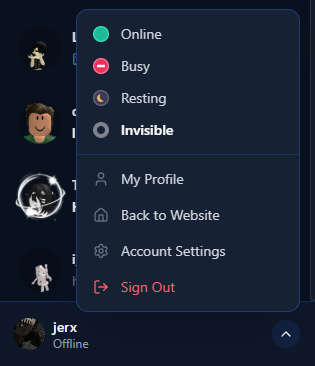
- Click your own user bar at the top or bottom of the sidebar.
- Pick a status from the menu:
- Online
- Busy
- Resting
- Invisible (appears offline to others)
- Your status updates right away.
What your status affects
- The presence badge shown next to your name on your profile and in chat.
- Which auto-reply fires when someone messages you. Each status can have its own message, see How to set IM auto-replies.
Was this article helpful?