
Avatar frames: how to unlock and equip them
 By jerxUpdated September 6, 2026
An avatar frame is a decorative border around your profile picture. You collect frames from different sources and equip whichever one you like.
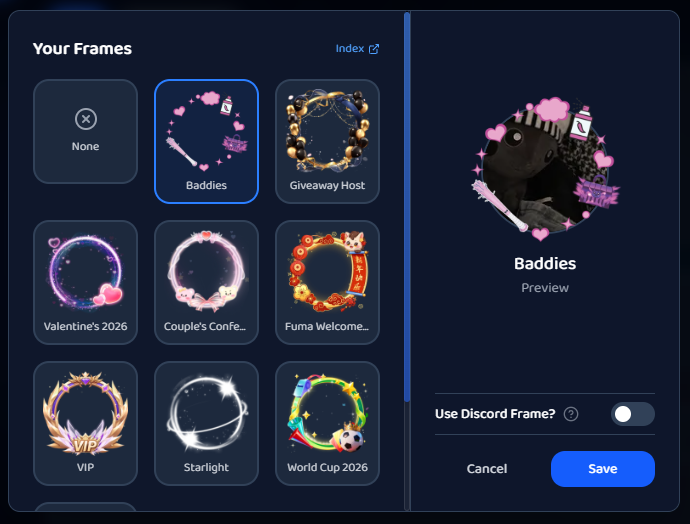
Where frames come from
- VIP Crown, while you have VIP.
- Known Trader gold frame, with the Known Trader badge.
- YouTube / TikTok frames, with the Content Creator badge.
- Achievement frames, for example the Starlight frame you get by verifying your email.
- Event frames, seasonal and special-event frames (holidays, community events, and so on).
- Staff and dev grants, handed out for special reasons.
Browse your collection
Open the Frame Collection page. It shows every frame with its state (Owned, Equipped, or Locked), a source label (VIP, Creator, Event, Staff, and so on), and, for achievement frames, a progress bar toward unlocking them. Locked frames without a set requirement note that they're "available for collection via special events or store purchases."
How to equip one
From the collection page: open here and click Equip on any frame you own (or Unequip to remove it).
From Settings:
- Go to Settings, open Edit Profile.
- In the Avatar Decoration card, click Change.
- Pick a frame in the Your Frames window.
The VIP Crown only shows while your VIP is active. If you're a VIP member syncing a Discord avatar decoration, that overrides site frames, see How to change your profile display (VIP).
Related
Was this article helpful?